
Accurate work orders are essential for efficient field service operations. They ensure technicians arrive prepared, reduce delays, and improve job completion rates. A detailed work order should include precise customer and site details, equipment specifics, clear task instructions, required tools, and safety protocols. Missing or vague information can lead to wasted time, errors, and frustrated customers.
Key highlights from the checklist:
- Verify customer/site details: Double-check addresses, contacts, and access instructions.
- Specify equipment information: Include serial numbers, model details, and locations.
- Clear problem descriptions: Avoid vague terms; provide specifics and attach photos if possible.
- List tasks and resources: Break down steps, prioritize, and list tools and materials.
- Emphasize safety: Outline PPE, hazards, and compliance requirements.
Tools like ServiceEmpire.AI can simplify this process by automating data entry, integrating historical records, and ensuring accuracy at every step. Accurate work orders not only save time but also enhance safety and customer satisfaction.
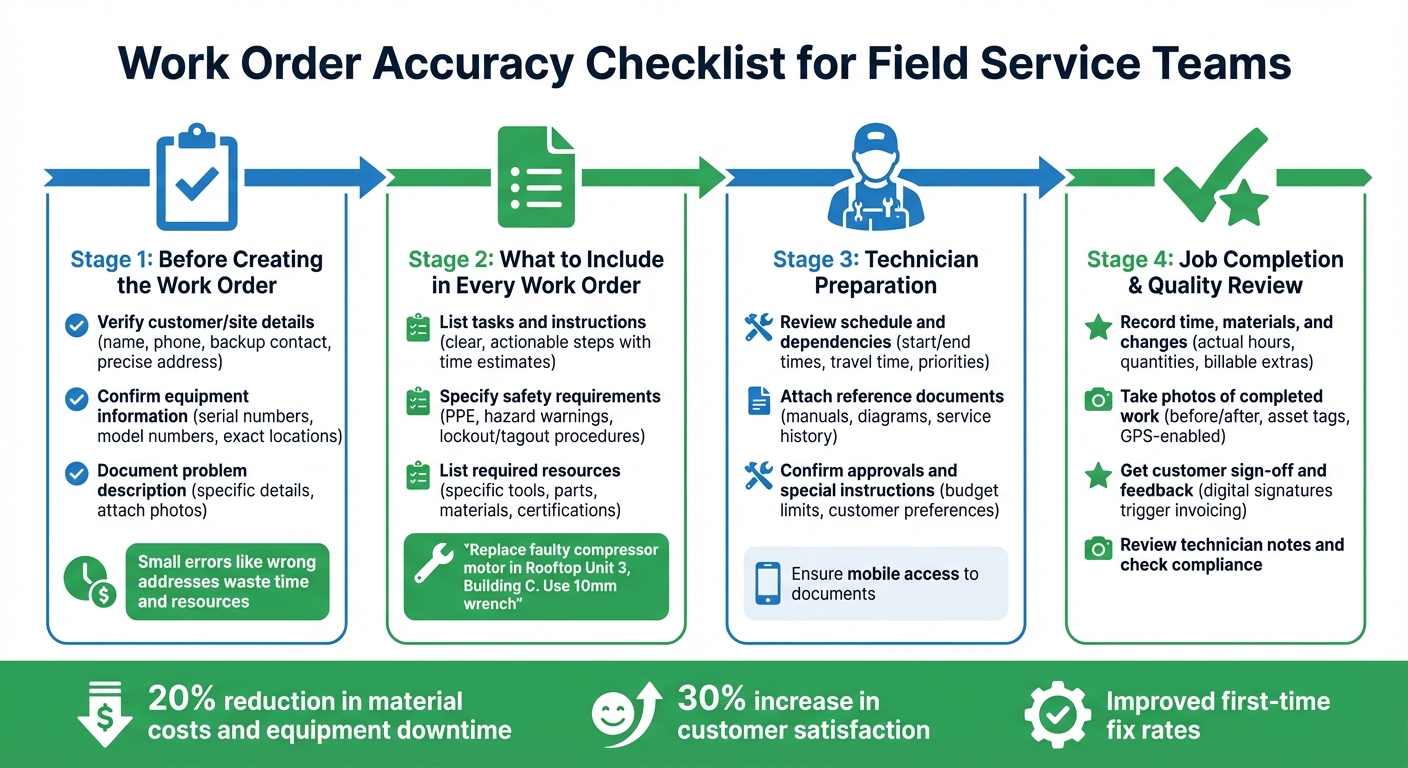
Work Order Accuracy Checklist: 4-Stage Process for Field Service Teams
10 Steps to Creating Effective Digital Checklists
Before Creating the Work Order
Getting the details right from the start is critical. A small error, like a typo in an address or a missing gate code, can send your technician to the wrong location, wasting time and resources.
"A field service work order is only as strong as the info it holds. If a tech shows up to a job without clear instructions, missing parts, or the wrong contact, you're already playing catch-up." - Tyler McNamara, author at BuildOps
Before diving into your work order system, take a moment to double-check the basics. This simple step can save time, prevent costly errors, and ensure your team stays on track.
Verify Customer and Site Details
Start with the essentials: the customer's full name, their primary phone number, and a backup contact for someone who will be on-site. Make sure the service address is precise, including building numbers, floor levels, or unit specifics. For example, "123 Main Street" won’t cut it if the property has multiple buildings or entrances. Double-check the address and scheduled date before finalizing the order; even a single wrong digit can derail the job.
Don’t forget access details like gate codes, parking instructions, security protocols, and any site restrictions. Simple intake questions like "Are there gated entries?" or "Any hazards on-site?" should be part of every customer interaction to avoid surprises.
Leverage GPS tools integrated into your work order system to confirm the exact location and assign the nearest available technician.
Once customer and site details are squared away, move on to verifying equipment information.
Confirm Equipment or Asset Information
Be specific when recording equipment details. Include serial numbers, model numbers, and exact locations. For instance, instead of writing "broken HVAC unit", specify "Carrier Model 58UVB, Serial #12345, located in Building C, Rooftop Unit 3." This level of detail ensures your technician arrives prepared with the right tools and replacement parts.
To reduce errors, use dropdown menus and conditional logic for entering equipment types or asset categories. For example, if the job type is "Repair", your form can automatically display fields for asset-specific details. This streamlines data entry and ensures consistency.
Connect your work order system to historical customer data so past records and inspection notes populate automatically. This eliminates the need for customers to repeat information and provides technicians with a full picture of previous service visits.
With equipment details in place, the next step is to document the problem clearly.
Document Problem Description
A well-written problem description can make all the difference. Avoid vague instructions that leave technicians guessing. Instead, be specific: "Repair conveyor belt motor (Model XYZ) in Section B is overheating and shutting down every 15 minutes; bring 10mm wrench and replacement belt."
Encourage customers to attach photos or videos of the faulty equipment to the work order. This gives technicians a clear idea of what to expect before they arrive. Use dropdown menus for priority levels (Low, Medium, High) and status updates to maintain consistent communication across the team. For complex or urgent jobs, consider adding a verification step where a supervisor reviews the work order for accuracy before dispatching.
Digital tools can simplify these steps. Some job management software systems offer features like automated GPS verification, standardized data entry forms, and integration with historical customer data to autofill basic details. These tools help field service teams create accurate work orders right from the start.
What to Include in Every Work Order
A well-prepared work order is key to avoiding unnecessary delays and ensuring your technician arrives ready to tackle the job. Overlooking even a small detail, like the correct tool size or a critical safety protocol, can throw the entire operation off track. Here’s what every work order should cover to keep things running smoothly.
List Tasks and Instructions
Include clear, actionable steps for the technician. Instead of vague descriptions like "fix the HVAC system", be specific: "Replace the faulty compressor motor in Rooftop Unit 3, Building C. Use a 10mm wrench and bring replacement belt Model XYZ."
Break down tasks by priority and provide time estimates for each. Using dropdown menus in digital work order forms can help standardize language across your team, reducing misunderstandings when multiple dispatchers are involved. For more complex jobs, attach helpful reference materials like equipment manuals, wiring diagrams, or instructional videos so technicians can review them ahead of time.
Specify Safety Requirements
Safety is non-negotiable. Outline all necessary personal protective equipment (PPE) upfront, such as hard hats, safety glasses, insulated gloves, or respirators. Also, include any specific hazard warnings like "confined space entry required" or "high-voltage equipment present."
For tasks involving electrical work or heavy machinery, detail lockout/tagout procedures to prevent accidents. Make these safety sections mandatory in your digital work order system, ensuring technicians can’t skip them without confirming compliance. To reinforce accountability, require technicians to upload photos of completed safety measures - like a tagged circuit breaker or a barricaded work zone - before closing the work order. This step ensures protocols are followed and provides a record for your operations.
List Required Resources
Provide a detailed list of every tool, part, and material needed for the job. Avoid generic instructions like "bring tools." Instead, specify: "10mm socket wrench, replacement capacitor Part #AC-450, and thermal imaging camera." Reviewing the service history of the equipment can help identify any specialized tools or parts that might be necessary.
Don’t forget to include technician qualifications in the resource list. For example, if the job involves refrigerant handling, clearly note that an EPA 608-certified technician is required. This ensures the right person is assigned to the task.
Link your work order system to real-time inventory tracking so technicians can check part availability before heading out. If a crucial component is missing, they can either order it or reschedule the job, avoiding wasted trips and frustrated customers.
Technician Preparation Checklist
Before a technician heads out, dispatchers and field crews need to double-check some key details. Skipping this step can lead to unnecessary callbacks and wasted trips, but a quick review can save time and ensure the job gets done right the first time. This checklist helps maintain the accuracy of the work order all the way to execution.
Review Schedule and Dependencies
Make sure the job's start and end times are confirmed, including travel time. If the technician has more than one job lined up for the day, check for any dependencies, like waiting for another crew to finish their part. Also, verify that critical details such as gate codes, site contact names, and phone numbers are included to ensure smooth site access.
It's also important to set clear priorities. For instance, if an emergency pops up, dispatchers should know which lower-priority tasks can be postponed without causing chaos. Using standardized priority labels, like "high", "medium", or "low", keeps everyone aligned and avoids confusion.
Attach Reference Documents
Technicians shouldn't have to dig through piles of papers to find what they need. Attach all relevant documents: like wiring diagrams, equipment manuals, photos from previous jobs, or service history directly to the work order.
Make sure these documents are easy to access on mobile devices, so technicians can pull them up even if they're offline or in an area with poor connectivity.
Confirm Approvals and Special Instructions
Before the job begins, double-check that all customer approvals, budget limits, and special requests are documented. Confirm any specific conditions, such as preferred work times or designated entry points, to avoid miscommunication and mid-job delays. Digital work order systems with mandatory fields can help ensure these critical details aren't missed.
Using a platform like ServiceEmpire.AI can make this whole process smoother by integrating all these checklist items into your workflow, keeping everything organized and easy to manage.
Job Completion Documentation
Accurate completion documentation is the backbone of finalizing any service order. As outlined in earlier steps, this process is critical for protecting revenue, verifying any changes, and keeping service records intact. Missing or incomplete documentation can lead to billing disputes, unbilled extras, and confusion if a customer reaches out later. This final stage ensures the entire work order process flows seamlessly into billing and quality assurance.
Record Time, Materials, and Changes
Technicians should log actual hours worked, not just rely on the original estimates. This includes keeping track of travel time, delays caused by site conditions, and any waiting periods. For materials, it’s essential to document exact quantities used, unit prices, and model or serial numbers for installed equipment.
If unexpected changes arise during the job, like discovering additional issues or requiring extra parts, they should be recorded immediately as billable extras. Be sure to note the who, what, when, and why of each change to keep everyone aligned. For instance, if a technician finds corroded wiring not included in the original scope, they should add a detailed description, attach clear photos, and obtain verbal approval from the customer before proceeding.
Using mobile-first forms with dropdown menus and predefined fields can reduce errors and ensure consistency across the team. Digital tools with features like voice-to-text notes are especially helpful in tight or challenging workspaces.
Once these details are logged, the next step is to visually confirm the job’s quality.
Take Photos of Completed Work
Photos are a key part of documenting work and safeguarding against future disputes. Technicians should take clear images of the initial issue and the completed fix. Include asset tags, serial numbers, and wide-angle shots of the job site.
Before leaving, technicians should review the photo quality to ensure clarity. GPS-enabled tools can automatically record the time and location of each photo, creating a reliable audit trail for compliance and reimbursement. This is especially important because contractors handle mostly field service work.
Even in areas with poor connectivity, mobile-enabled tools allow technicians to capture and sync data. Adding voice-to-text or handwritten notes alongside photo uploads provides additional context for back-office teams and customer reviews. Automated reporting systems that integrate photo documentation have drastically reduced report generation times, from hours to just minutes.
Get Customer Sign-Off and Feedback
The final step is securing the customer’s sign-off, which clears the way for billing and invoicing. A signed confirmation, combined with documented photos, completes the service record. This signature ties everything together and clears the path for billing to do its part.
Digital forms make the sign-off process faster and more reliable than traditional paper methods, triggering prompt invoicing. This step is crucial in the quote-to-cash workflow, transitioning the work order directly into invoicing and payment.
Using an all-in-one digital solution simplifies every step of the documentation process. From tracking hours and materials to capturing photos and obtaining customer sign-offs, these tools ensure work orders are thorough, accurate, and ready for audits.
"Accurate work order documentation is beyond routine paperwork, and it's actually the support system of every efficient field service operation." - Swivl Team
Quality Review After Job Completion
When a technician wraps up a work order, the job isn't quite done yet. The next step is a critical one: a thorough quality review. This process ensures that everything is up to standard and can prevent headaches like billing disputes, compliance problems, or callbacks. It’s also the key to accurate invoicing. Start by carefully reviewing the technician’s notes and test results, making sure every detail aligns with expectations.
Review Technician Notes and Test Results
Technician notes need to be clear and specific. For example, a note like "replaced faulty motor in Unit 5" is far more useful than a vague statement like "fixed machine." Look for precise measurements, test results, and observations about the site that could affect future service needs. Even small errors, like an incorrect address or a mismatched due date, can create unnecessary delays and waste time.
For more complicated or high-priority jobs, consider adding a second layer of review. A supervisor or colleague can double-check the details to catch any data entry mistakes or missing information.
Using version control tools to log updates, complete with timestamps and explanations, adds another layer of accountability. This audit trail is invaluable for resolving disputes and ensuring transparency.
Check Compliance with Standards
After reviewing the technician's documentation, the next step is to confirm that the work meets all relevant standards. This includes safety, regulatory, and company-specific requirements. Photos attached to the work order can provide visual proof that the job was executed properly and that the site was left in good condition. For industries like fire protection, HVAC, or electrical services (where compliance is non-negotiable) this step is especially important.
To keep things running smoothly, set up automatic notifications. For instance, when a technician marks a job as "completed" on-site, your system can instantly alert the office, triggering a prompt review. Additionally, conducting quarterly audits of completed work orders can help identify recurring issues, delays, or areas where the team might need more training.
Update Work Order Status
Once the quality review is done, finalize the work order. Be sure to include any recommendations for future service, such as noting equipment that may soon need replacement or flagging recurring problems for ongoing monitoring. This step not only closes out the current job but also helps with future planning and keeps records complete for reference down the line.
From tracking version histories to automating notifications, the right software and tools make it easier for field service teams to maintain high standards without adding extra administrative work.
Conclusion
Accurate work orders are the backbone of efficient and profitable field service operations. When technicians arrive on-site armed with precise instructions like "replace motor in Unit 5 using a 10mm wrench", they can dive straight into the job without wasting time on calls to the office or asking customers to repeat the issue. This level of clarity eliminates guesswork, improves first-time fix rates, and cuts down on costly callbacks that eat into profits and frustrate customers.
Automated work order systems can deliver measurable results, such as reducing material costs and equipment downtime by 20% and increasing customer satisfaction by 30%. These numbers highlight the importance of detailed and accurate work order documentation.
This approach doesn’t just cut down on errors; it elevates operational efficiency across the board. By following a clear checklist, you can reduce mistakes, boost technician productivity, and build stronger customer loyalty.
Looking for tools to make this process even easier? We offer free, trade-specific resources created by operators who’ve scaled from a single truck to 9-figure service enterprises. No credit card is required. Use their tools to generate trade-specific SOPs, launch ad campaigns, and implement leadership frameworks that drive consistency and excellence across your teams. Check out the tools at ServiceEmpire.AI to start building better work orders and SOPs today.
FAQs
What are the most common mistakes to avoid when creating a work order?
Creating a clear and detailed work order is crucial to helping field teams complete their tasks efficiently and without mistakes. Here are some common pitfalls to steer clear of:
To avoid these missteps, consider using a standardized checklist for consistency. Tools here at ServiceEmpire.AI offer free, AI-powered templates and checklists, crafted by industry professionals, to help field teams sidestep these issues and consistently deliver top-notch service.
How does ServiceEmpire.AI help field service teams ensure work order accuracy?
ServiceEmpire.AI makes work order management a breeze with its AI-driven tools designed to keep every detail clear, complete, and accurate. Its digital checklists and SOP templates cover everything (parts, tools, safety equipment, and on-site tests), eliminating the risk of vague instructions or overlooked steps.
Thanks to real-time AI validation, the platform catches incomplete or inconsistent data as work orders are being created. Automated workflows then ensure quick approvals and proper resource allocation before technicians even hit the road. By simplifying the entire process, ServiceEmpire.AI enables field teams to work efficiently and deliver precise results, boosting customer satisfaction and cutting down on expensive rework.
Why is it important to include detailed equipment information in work orders?
Including precise equipment details in work orders is crucial for ensuring technicians are fully prepared before they arrive on-site. When specifics like required parts, tools, and technical specs are clearly outlined, it eliminates unnecessary guesswork, reduces mistakes, and increases the likelihood of resolving issues on the first visit.
Having accurate equipment information also speeds up job preparation and prevents delays, resulting in quicker and more dependable service for customers. This level of clarity not only upholds professional standards but also enhances overall team productivity.