Closing the feedback loop is more than just responding to customer feedback - it’s about creating trust and improving experiences. Here's how businesses can effectively turn feedback into action:
- Collect Feedback: Use short, timely post-service surveys to gather input while the experience is fresh.
- Organize Insights: Centralize feedback from all channels (emails, calls, reviews) and categorize it for actionable patterns.
- Take Action: Prioritize issues using a scoring model (frequency, impact, revenue risk, and effort) and resolve them promptly.
- Communicate Changes: Inform customers about the actions taken, whether through personalized emails, newsletters, or direct calls.
- Measure Progress: Track KPIs like resolution time, recurrence of issues, and customer satisfaction after fixes.
Key Stats:
- Responding within 48 hours boosts retention by 12%.
- Businesses that close feedback loops see 3x more promoters in future surveys.
- Only 5% of companies inform customers about changes, despite 95% collecting feedback.
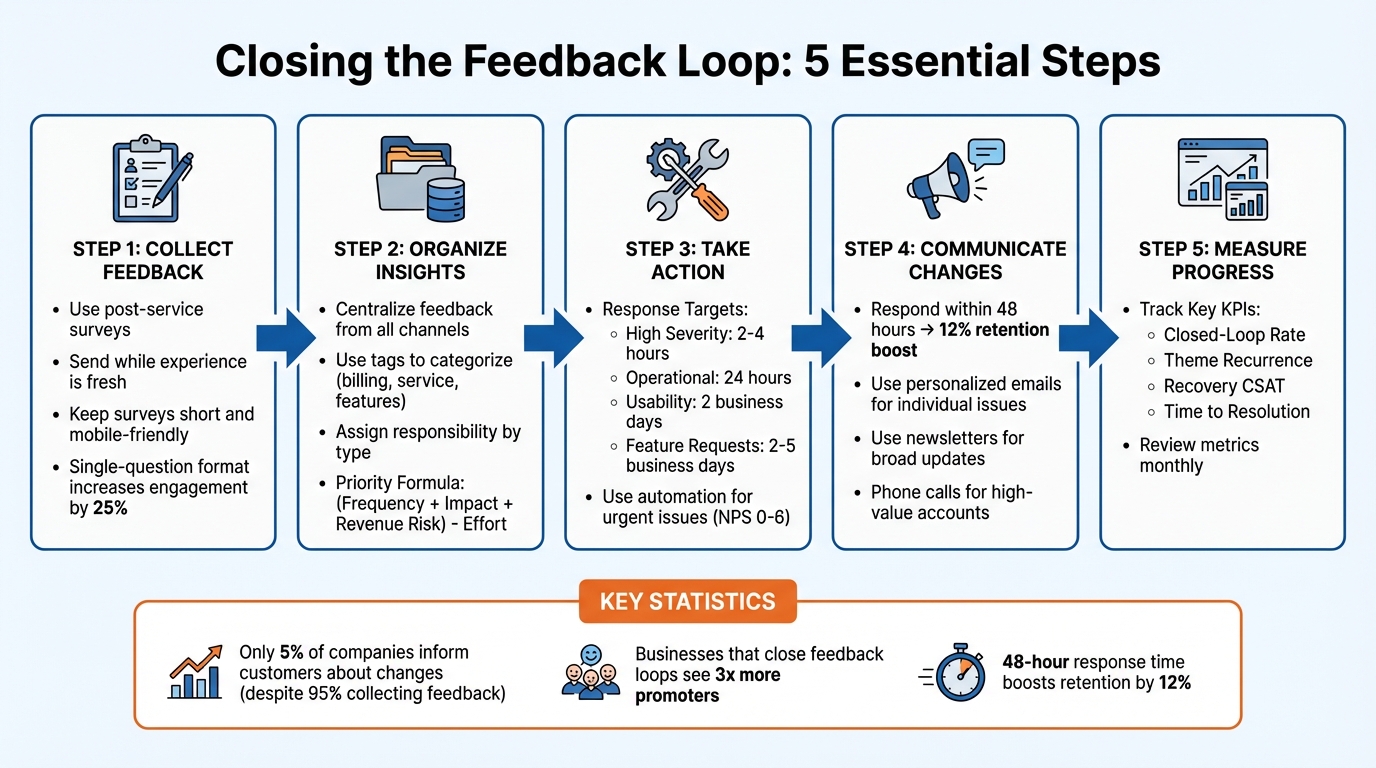
5-Step Framework for Closing the Customer Feedback Loop
How to Collect and Respond to Feedback
How to Use Post-Service Surveys
Timing is everything when it comes to post-service surveys. Send them right after the job is completed, while the experience is still fresh in the customer’s mind. A simple, single-question format like "Were we able to help you?" with a yes/no or emoji rating can increase engagement by 25% compared to longer surveys. To ensure maximum participation, keep the survey short and mobile-friendly. If it feels like a chore, customers are likely to abandon it.
For deeper insights, include an optional comment box that appears only when a respondent selects "No" or "Kind of." This approach keeps satisfied customers from feeling overwhelmed while capturing valuable feedback from those with concerns. For high-value clients, consider arranging a brief 15-minute feedback call. These calls can uncover issues that even well-designed surveys might miss.
Once feedback is collected, the next step is to organize and prioritize the insights in a useable fashion.
How to Log and Prioritize Feedback
Feedback can come from various channels: texts, emails, calls, and online reviews. To manage it all, centralize this information in one system. Use tags to categorize feedback into types, such as billing problems, service issues, or feature suggestions. This makes it easier to identify patterns and trends.
Assign responsibility based on the type of feedback. For example:
- Service failures can go to operations.
- Process gaps should be flagged for management.
- Churn risks belong with customer success teams.
To prioritize effectively, use a simple scoring model: Priority = (Frequency + Impact + Revenue Risk) - Effort
This simple formula helps focus attention on the most pressing issues first.
Track progress using clear status markers like: Open → In Progress → Resolved → Followed Up → Closed. Here's a quick guide for response and resolution timelines:
For issues that require immediate attention, automation can help ensure a timely response.
How to Automate Responses to Urgent Issues
Automation can be a game-changer for handling urgent feedback. Set up automatic alerts for detractor scores (NPS 0–6) or low satisfaction ratings. This allows supervisors to step in within 24–48 hours. For example, Eaton Corporation, a global power management company, drastically cut its feedback response time from 4 months to just 48 hours in March 2023. Using CustomerGauge’s closed-loop system, they implemented a "Hot Loop" process that triggered real-time notifications to case managers. Renan Cardoso, EMEA Business Process Owner for Customer Experience, spearheaded this initiative.
When a complete solution isn’t immediately available, send a same-day acknowledgment. Let the customer know who is handling their issue and when they can expect an update. As Karol Koronowicz, Human Experience Specialist at Responsly, points out:
"The key is not perfect speed - it's predictability. Even 'we don't have an ETA yet, but we're tracking this and we'll update you by Friday' closes the loop better than silence."
Using Feedback to Improve Your Business
Turning customer feedback into meaningful changes is the final step in closing the feedback loop. While 95% of companies collect feedback, only 10% use it to make improvements, and just 5% inform customers about the changes made. That’s a huge missed opportunity. Let’s look at how you can transform feedback into actionable steps that drive real results.
How to Update SOPs Based on Feedback
Start by identifying recurring patterns in your feedback. The top 10% of repeated issues can account for 40% to 70% of all feedback. For instance, if you notice repeated complaints about scheduling conflicts or unclear billing, it’s a clear sign to revise your standard operating procedures (SOPs).
Organize feedback into categories like scheduling, billing, or service quality, and assign each to the relevant team. Operations for service-related issues and management for process-related gaps. Establish a weekly review process to turn these recurring issues into actionable updates. For example, if customers frequently mention confusion about service costs, update your pricing communication to include clear, upfront estimates.
Once you’ve updated an SOP, monitor "Theme Recurrence" to see if the same issue persists. If it does, you may need to dig deeper to address the root cause.
How to Use Employee Input
Your employees, especially those on the front lines, often have valuable insights that complement customer feedback. Field technicians, for example, might notice recurring problems that customers don’t explicitly mention in surveys. These insights can be critical for identifying gaps that need attention.
Make it easy for employees to share their observations, whether through a simple text system, team meetings, or a shared digital form. For instance, if a technician reports that customers are confused about warranty terms, you can immediately update your communication materials and adjust training for new hires.
By combining customer feedback with employee insights, you can uncover both the symptoms and root causes of issues. For example, if customers complain about long wait times and technicians point out inefficiencies in the routing system, you’ve identified both the problem and its source. A structural change, like improving dispatch procedures, can resolve the issue more effectively.
How to Track KPIs to Measure Feedback Impact
Measuring the results of your changes is just as important as making them. Use these key performance indicators (KPIs) to gauge whether your feedback-driven improvements are working:
Perfection isn’t the goal. Progress is the goal. By reviewing these metrics monthly, you can spot trends early and fine-tune your processes before small problems grow into larger ones. These KPIs ensure that every feedback loop contributes to your business’s ongoing improvement.
How to Communicate Changes and Close the Loop
Acting on feedback is only part of the equation. Closing the loop by communicating those changes is just as important. After gathering and analyzing feedback, it’s essential to share the actions taken. The numbers don’t lie: 95% of companies collect customer feedback, but only 10% act on it, and a mere 5% inform customers about the changes. Businesses that close the loop see more promoters in their next survey.
How to Share Updates with Customers
Asking for feedback and then going silent is a fast way to lose trust. Responding within 48 hours can increase retention by 12%. For example, if a customer reports an issue like a billing error, acknowledge it quickly with a personalized email or phone call explaining the resolution. If you're looking for how to respond appropriately to negative feedback comments, here are seven negative review responses that work.
For individual concerns, personalized emails are highly effective. But for broader updates - like introducing a new online booking system or revising warranty terms - newsletters can efficiently reach a larger audience. It’s worth noting that 86% of consumers are willing to pay more for better experiences.
For high-value accounts, direct outreach such as phone calls or quarterly business reviews can strengthen relationships. Companies with well-structured closed-loop systems can cut response times from months to just 48 hours, ensuring cases stay open until the customer confirms their satisfaction.
If certain suggestions can’t be implemented, explain why in a clear and concise way. This transparency helps maintain trust.
Don’t forget to share these updates internally as well. It’s just as important for your team to know how their efforts are driving change.
How to Share Feedback Outcomes with Employees
Internally, sharing the results of customer feedback fosters engagement and accountability. When employees see how their work contributes to improvements, they’re more motivated. Leadership plays a big role here, as managers and team leaders account for 70% of the variance in team engagement.
Discuss aggregated feedback trends during weekly meetings or share updates through tools like Slack or Microsoft Teams. Celebrate wins. If customer feedback highlights an employee’s professionalism, acknowledge it. For example, if recurring complaints about response times inspire a new dispatch system, explain how that feedback led to the change. This builds a sense of ownership and teamwork.
For sensitive feedback, one-on-one conversations are best. Frame these discussions as collaborative opportunities to address challenges.
Regular updates are key. 60% of employees want feedback weekly or daily, and that number jumps to 72% for those under 30. Companies that prioritize continuous feedback enjoy a 14.9% lower turnover rate.
Comparing Different Communication Methods
Different scenarios call for different communication approaches. Here’s a quick breakdown of common methods:
The trick is to choose the right method for the situation. Whether it’s a personal email for a specific concern or a newsletter for company-wide updates, your communication should show customers that their input matters. After all, 68% of customers leave businesses when they feel unappreciated.
How ServiceEmpire.AI Simplifies Feedback Management
Closing the feedback loop is crucial for any service business, and ServiceEmpire.AI makes it easier by helping you create customer communication SOPs. Pre-service automatic reminder sequences. Automatic post-service surveys as soon as jobs are marked complete. This free AI tool can also help you create SOPs for your team on how to handle customer complaints, or how to make sure your new hires are onboarded and trained properly.
Customer feedback isn’t just a tool for damage control. Yes, there will be grumpy customers who will need handled. But oftentimes, customer feedback is a goldmine for operational improvements. Whether it's feedback for technicians, customer service representatives, or estimators, you as the business owner want to make sure gaps are addressed. That way, your team gains actionable insights to improve performance.
Conclusion: Building a Culture of Continuous Improvement
Closing the feedback loop is a game changer for field service businesses. It's all about trust, between your team, your customers, and your leaders. Yet, only a small percentage of companies take the extra step to act on and communicate feedback. That small group gains a huge advantage because customers see their input making a real difference.
Companies that consistently close the loop enjoy measurable benefits, like reducing churn by at least 2.3% annually. On the flip side, businesses that neglect feedback often see churn rise, both churn in customers and churn in their organizations. Closing the loop turns occasional customers into loyal advocates, creating a ripple effect of positive outcomes.
For employees, fostering a culture of continuous improvement brings real benefits. It breaks down silos and gives frontline technicians a sense of ownership over the customer experience. When team feedback leads to better training, updated SOPs, and happier customers, morale skyrockets, and employees see how their efforts tie into the company’s larger mission.
Key Takeaways
To fully integrate feedback into your operations, follow this four-stage framework: Collect, Categorize, Act, and Follow-up.
Each stage plays a crucial role in translating customer input into meaningful results.
- Speed is critical: For high-severity issues, aim to respond within 2–4 hours and close the loop within 48 hours.
- Inner vs. Outer Loops: Address immediate fixes through "Inner Loops" handled by frontline staff, while "Outer Loops" focus on structural changes that require management input.
- Personalized follow-ups matter: Instead of generic "thank you" messages, provide specific updates on what changed. This builds trust far more effectively.
- Measure success: Track your Closed-Loop Rate, aka the percentage of feedback items resolved and followed up on. With 86% of consumers willing to pay more for a better experience, this metric is critical.
Next Steps for Field Service Business Owners
Take a hard look at your feedback process. Are you collecting data but failing to act on it? Are you resolving issues without letting customers know about the changes? Identify gaps and set clear SLAs: respond to high-severity issues within 2–4 hours and create full resolution plans within 24 hours.
Centralize all feedback in one place so your team can access key customer insights. Use Key Driver Analysis to zero in on the top 10% of issues that often account for 40% to 70% of feedback volume. Prioritize these areas to make the biggest impact, and empower employees by showing them how their work contributes to the outcomes.
Tools like ServiceEmpire.AI make this process easier. From response templates to AI-driven SOP updates and executive reports, these tools handle the heavy lifting. Best of all? No credit card is required. Visit ServiceEmpire.AI to explore the toolbox and start closing feedback loops faster than ever.
FAQs
What are the best ways to prioritize customer feedback and take action?
To make the most out of customer feedback, businesses should follow a structured process that ensures no valuable insights slip through the cracks. This involves collecting, analyzing, and acting on feedback quickly and thoughtfully.
Start by focusing on feedback that highlights critical issues or opportunities for improvement. Prioritizing these areas ensures that resources are directed toward changes that will have the greatest impact on customer satisfaction.
Speed matters. Aim to respond to negative feedback or customer concerns within 48 hours whenever possible. Quick follow-ups show customers that their voices are heard and valued. Just as important is transparency. Clearly communicate what actions are being taken based on their input. This builds trust and reinforces the idea that their feedback truly makes a difference.
To measure the success of these efforts, tools like KPIs and analytics can be incredibly useful. They help track outcomes and ensure changes align with broader business objectives. By blending thoughtful analysis, quick responses, and open communication, businesses can transform customer feedback into meaningful improvements that strengthen loyalty and retention.
How should I communicate changes to customers after receiving their feedback?
To communicate changes effectively after receiving customer feedback, focus on being clear, timely, and personal. Start by expressing gratitude for their input and recognizing the concerns they’ve shared. Then, outline the specific adjustments or improvements made as a direct result of their suggestions.
Use direct communication channels, like personalized emails, phone calls, or messages, to ensure your response feels sincere and tailored to the individual. If the changes are still in progress, share updates at meaningful points to keep them informed and show that their feedback is actively shaping your actions. Acting quickly (ideally responding within 48 hours for urgent matters) shows dedication and builds trust. Closing the feedback loop in this way strengthens relationships and encourages long-term loyalty.
Happier customers, increased loyalty, and less effort spent managing feedback.
Lead With Confidence and Clear Direction